Showing posts with label Toronto MotoTrbo DMR. Show all posts

CS700 Firmware upgrade to 700A or 750

Latest news and updates on Connect System website...

Connect Systems decided that because we cannot have the customers do the upgrading themselves because of the above reasons, we would charge a nominal fee of only $20 including shipping within United States to upgrade an old CS700 to the new CS700A. For customers outside the United States, we will charge $15 plus shipping. For those customers it would be advantageous to ship multiple radios at the same time.


To upgrade from a CS700 to a CS700A requires the following steps:

1. Get a copy of the tuning parameters.
2. Take the radio apart to get to the PCB
3. Short two points on the PCB and turn on Power
4. Load New Driver
5. Load New Firmware
6. Convert new tuning parameters to new turning parameters
7. Use service Monitor to tune certain parameters if necessary
8. Initialize code plug

There are three issues with having the customers do this themselves.
(1) If you make a mistake you might brick the radio and could take at least 4 hours to recover.
(2) If you short the wrong spot on the radio you might damage the radio.
(3) We have no way of protecting our intellectual property from being copied by other manufacturers.


Connect Systems decided that because we cannot have the customers do the upgrading themselves because of the above reasons, we would charge a nominal fee of only $20 including shipping within United States to upgrade an old CS700 to the new CS700A. For customers outside the United States, we will charge $15 plus shipping. For those customers it would be advantageous to ship multiple radios at the same time.


To Convert the CS700 to a CS750 requires the changing of a memory chip. This means unsoldering an existing IC and soldering in a new IC. Then you following the above 8 instructions. For that the price is $60 including shipping. For customers outside the United States, we will charge $55 plus shipping. For those customers it would be advantageous to ship multiple radios at the same time.
How to update Contacts in the CS-700 codeplug

Here's the writeup I did for our club as an intro, in case it works for anyone else.
Radio ID Database
Every DMR ham has a Radio ID assigned to them by DMR-MARC, which is where this database comes from.
(Request link is here: http://www.dmr-marc.net/request_subscriberID.html) This same Radio ID can be programmed into all your radios, since only one will Tx at a time. 
It’s maintained by a team of guys that do a great job with really fast turnaround on updates and new registration.  The whole database is here:
http://www.n6dva.org/trbo-database/trbo_users_view.php

Filter the Listing
Go to Filters and set up:

Connect Systems CS700 DMR Portable Radio Review

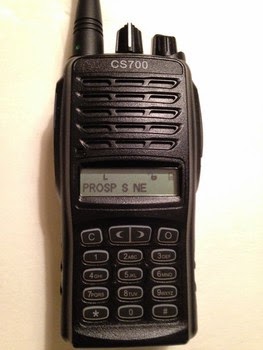
The Connect Systems (CSI) CS700 portable radio is a low cost, high value Digital Mobile Radio (aka DMR) radio that has recently been released to the ham radio community. Overall, this is a great single band UHF DMR radio for ham radio use on the 70cm band and will make a great radio for anyone interested in getting started with DMR. At the time of this review, the pricing for a new CS700 directly from CSI was $180USD, which includes a 1-year warranty.
Price: $180USD
Author’s Rating: Excellent

(4 out of 5)

CS-700 Codeplug - Example

The PAPA CS-700 Codeplug is set up to get the PAPA System member on the air quickly. It is based on the CAL DMR CS-700 Codeplug with contributions and input from PAPA members (N9QE, KJ6RAY, KK6AL and WA6JFK), and has the following changes for improved PAPA System functionality:
  • Mt. Lukens / Palm Springs / Mt. Woodson / Mt. Palomar / Santiago / Sunset Ridge DMR repeater Home Zones
  • "PAPA Regional" talkgroup 7272
  • "San Diego Regional" talkgroup 92101 (Mt. Palomar and Woodson)
  • "Worldwide Spanish" talkgroup 14 and "Worldwide French" talkgroup 11 (Santiago only)
  • Digital Contact list includes California and Nevada DMR users.
  • Revised button definitions
  • Most networked UHF DMR repeaters in California, Arizona and Nevada.
  • "Local" channel uses a Digital RX Group Call so when the local channel is selected, you will hear (and be able to reply to) traffic on the Local and California Regional (SoCal, CenCal, NorCal) talkgroups for that repeater.
  • Zones for the BAYCOM, SF TRBO, Nevada, Arizona and San Diego repeaters have actual talkgroups in use
  • 5 custom scan lists (detailed below)
  • PAPA analog repeaters
  • "Placeholder" channels, Digital RX Groups, Scan Lists and Zones for your own customization

PAPA CS-700 Codeplug

CS-700 UHF Analog/Digital DMR Portable Radio

CS-700 UHF Analog/Digital DMR Portable Radio

CS-70x DMR Portable Radio

CS-700 UHF Analog/Digital 4 Watt DMR...
* Compatible with Motorola (MotoTRBO), Hytera DMR Radios
* LCD Display and full keypad.
* Highest Power. 4 Watts UHF.
* Better Battery. 1700 mAH Lithium Ion
* More Channels. 1000 channels available

Product Description
This full featured professional radio is the best in its class. Compare this radio to the competitors and you can see why there is no better radio to buy than the CS700. Some of its highlights are as follows: Compatible with Motorola's (MotoTRBO), Hytera DMR Radios. Best price DMR Radio on the market! LCD Display and full keypad. Highest Power. 5 Watts VHF. Better Battery. 1700 mAH Lithium Ion Better waveform. DCS looks like a digital waveform, CTCSS looks like a sine wave. More Channels. 1000 channels available Better Documentation. No guessing how the unit really works. With this radio you can now have a digital radios at less than the cost of an Analog Radio This radio is built to commercial standards and will cover commercial Frequencies. Frequency Type: Single Band Frequency Ranges: 400 MHz to 470MHz Dimensions: 4.45" x 2.18" x 1.38" Channel Capacity: 1000 Channel Spacing: 12.5 kHz or 25 kHz LCD display Current Drain: 100mA at standby, 50mA at power save mode Battery life/duty (90/5/5):10 Hours (analog) 14 Hours (Digital) 


Programming Software for the Connect System CS700

This video is a quick preview of the new beta Programming Software for the Connect System CS700. Topics covered are:

- Things that haven't changed.
- Things that have changed that matter to Amateur Radio
- Contextual Help

CSI CS700 DMR Radio Menu

Some people seem to be having difficult using the CSI CS700 DMR radio and can't find the channels that are programmed in. This is a very 'quick and dirty' video showing how to navigate the menu system.

Note that the only keypad buttons that actually do anything are those in the top row.

Connect Systems CS700 Canada contact phone number

Connect Systems CS-700 - Canada contact ::

Justin Coates
519 816 2841
justingcoates@gmail.com 

The price I quote for example to a resident of Ontario would be:
$220 for the radio
$28.60 (13% Sales Tax)
$15 shipping (my actual cost)
Total: $263.60 CDN


CS700 Antenna Recommendation

With my CS700, I've been using the Larsen SPWH23450 whip antenna, with good result. Here are the details:

Larsen SPWH23450
Antenna Connector Option: SMA FEMALE-SFU TYPE
Actual Frequency: 425-475 MHz

There is also a stubby version:

Larsen SPHS23450
Antenna Connector Option: SMA FEMALE-SFU TYPE
Actual Frequency: 432-468 MHz

While not listed at The Antenna Farm, either of the antennas can probably be special ordered for around $20 each, plus shipping. http://www.theantennafarm.com

Review Connect Systems CS700 DMR Handheld

Let me start with a confession: personally I don’t care much about digital modes. That doesn’t mean that I don’t keep track of the latest technologies, and (hopefully) this short review is proof of that.

DMR-logoI’m not going to explain in detail what DMR (Digital Mobile Radio) is, as there are many sources on the Internet that will do a much better job than I could.

For your convenience I uploaded a DMR primer, the link can be found at the end of this article. What I would like to do here is give you a basic idea of what you can expect, and – just as important – what not.
What you can expect

    Talk around the world by using repeaters. The functionality isn’t much different from D-Star.
    Optimal use of frequency space (time slots). DMR uses 2 time slots, which makes it possible to have one frequency harbor two QSO’s at the same time without interference.
    Extensive encryption options to prevent eavesdropping (illegal for ham use). Unless you know one key (basic privacy) or two keys (extended privacy) other people can’t listen in.
    On-screen call sign recognition. In order for this to work you need to update the subscriber ID list regularly. This will also open up the option to use ‘call routing’ (calling a specific station regardless of his/her location in the world). You can get your own subscriber ID here.
    Sending and receiving text messages. Think of it as SMS on a cell phone. You can compose messages on the fly, or program a number of preset messages.

What you shouldn’t expect

    A technology tailored to ham radio use. It’s not. DMR was conceived with commercial purposes in mind. You won’t find any dual-band radios, for example. If you want to have a mature, ham oriented digital system, go for D-Star instead.
    Great audio quality. Seven out of ten times I wasn’t able to recognize familiar voices, not even from people I talk to on a daily basis. Most people sounded like they just had a root canal, with a truckload of anesthetics preventing them from forming words properly. It’s a bit less poor than D-Star, but opinions vary wildly.
    100% compatibility between various brands. There are some minor differences between Vertex/Motorola, Hytera and this CS700, but making QSO’s will always work.
    Plug & Play out of the box experience. If you open the box the radio is nothing more than a clumsy paperweight. You need to program it.
    Using these things to the max without some basic computer knowledge. If you hate computers, DMR is not for you. The number of screens to-be-filled-in in order to make a so-called ‘code plug’ will initially make your head spin. Fortunately you can almost always download a ready-to-use code plug made by someone else.

PAPA CS-700 Codeplug

The most notable changes are the Zones for the PAPA DMR repeaters. The new Zone layout places the more popular TG channels in the lower channel positions for easy movement between talkgroups.

Custom Scan Lists: There are 4 custom scan lists as detailed below.

"Local DMR": Scans the Local, SoCal, SoCal 1 & 2 and PAPA regional TG on the Lukens DMR repeater. Selected by scanning from the "Lukens- Local" channel.
"Local A/D": Scans Local, SoCal, SoCal 1 & 2, and PAPA regional TG on the Lukens DMR repeater as well as PAPA 3, 4 and 8. Selected by scanning from the "Lukens- PAPA" channel.
"Home ALL": Scans all talkgroups on the Lukens DMR repeater. Selected by scanning from the "Lukens- SoCal" channel.
"PAPA DMR": Scans the Local, SoCal, SoCal 1 & 2 and PAPA regional TG on all three PAPA DMR repeaters. You will only hear traffic from the repeater you are in range of... sort of a "poor man's roaming". Selected by scanning from the "Lukens- SoCal1" channel on all PAPA DMR repeaters.

Here is the layout: